
Delays happen. But sometimes they’re avoidable — like some are during the GoGreen Loan Preapproval stage. This is where the lender reviews financial information, requests documents, verifies income, and completes a credit review, and it is this stage where delays happen most. Knowing how to prepare yourself and your customer for this stage can save everyone a headache.
Below is a quick look at Steps 1–5 and a few ways to help keep your project moving.
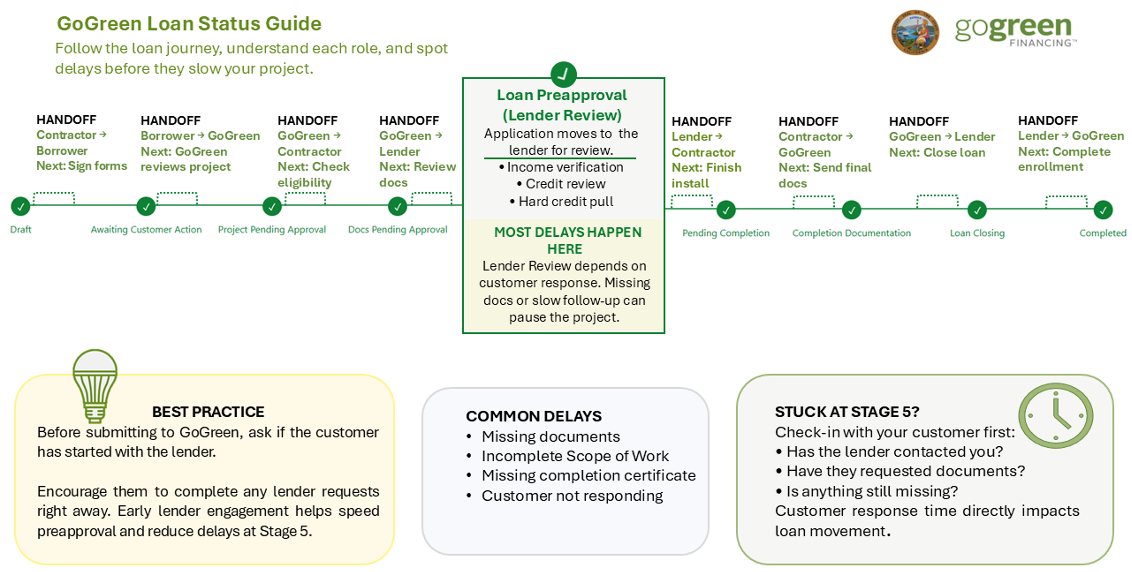
Step 1. Draft: Before uploading project details, confirm the borrower has contacted a lender. The contractor then enters the project details, including EEMs and costs. Utility bills may be uploaded at this stage or requested from the borrower through the portal.
Step 2. Awaiting customer action: Borrower signs the GoGreen Home Privacy Release, which is required. The borrower may also sign the lender’s Borrower Consent Form, if the lender provides one.
Step 3. Project Pending Approval: GoGreen Home staff reviews project measures, costs, and details for eligibility. Contractor notified via email when project is approved.
Step 4. Docs Pending Approval: GoGreen Home staff reviews utility bills and other required documents. Lender notified via email when project is approved.
Step 5. Loan Preapproval: Lender reviews borrower’s financial information. Lender requests proof of income and does a hard credit pull. Lender notifies the customer and GoGreen via email when approved. This is where most delays happen.
The portal uses the term “Preapproval” at Stage 5 because the loan can’t be considered final (or “Approved”) until project completion has been certified in Stage 7.
What you can do to speed up every step, up to and including Loan Preapproval.
-
Tell your customer early (before Step 1) that they will need to provide one month’s worth of recent utility bills for the project address.
-
Encourage your customer to contact a lender before you enter the project in Step 1.
Loan Preapproval will be much faster if the lender is already familiar with the customer.
-
Ask your customer to fill out the Borrower Consent Form, if available, in Step 2.
The GoGreen Home Privacy Release allows GoGreen Home to review the project, while the lender’s Borrower Consent Form allows the lender to discuss loan details with the contractor. If the borrower completes the lender’s consent form, the lender may be able to share whether documents are missing or whether the borrower is approved.
-
Remind your customer to respond quickly to lender requests in Step 5.
You can help them prepare in advance. They will need proof of income during this stage. If they are self-employed, they’ll need to provide recent tax returns. For the hard credit pull, they’ll need to provide a social security number, TIN, passport or other unique identifying number.
-
Follow up with your customer if lender requests are still pending.
Check the portal to see whether the project is stalled. If the borrower completes the lender’s Borrower Consent Form, you may also be able to contact the lender to confirm what is still missing.
If progress slows, use the Loan Status Guide to identify the current stage and check in with your customer to resolve lender requests quickly. Early follow-up can help keep the loan process moving toward funding.